
Building a Self-Serve Data Agent
May 3, 2026 • Adam Tourabi
I connected Claude to our Salesforce instance and the output was pretty bad.
It queried stage names that didn't exist, pulled from legacy fields that hadn't been populated in years, and came back with very inconsistent output. In a perfect world every field in your org is documented and sunsetted correctly, but reality isn't really like that. The data was there. The model just didn't know how any of it was structured.
I'm a marketing ops team of one, and I was trying to solve a problem that I think most ops people deal with: the ad-hoc data pulls, the "can you check this number" messages, the report requests that take fifteen minutes each but add up to half your week. I could build dashboards for this, and I have, but "actionable insights" dashboards have low adoption rates. People don't want to open a new tool or remember where something lives — they want to ask a question where they already are and get an answer back. For us that's Slack. So the interface decision came before anything technical: if it's not in Slack, nobody's going to use it.
I'd been thinking about what applied AI for marketing ops actually looks like — not the "use ChatGPT to write emails" version, but embedding AI into the systems and workflows your team already runs on. This is a walkthrough of how I built an agent that does that, what I learned about agent architecture along the way, and why the context you give the model matters more than the model itself.
Starting from open source
I was using Claude Code for GTM work and started looking at how people were building agents, specifically MOps people.
That's when I came across Joe Reitz's open-source Slack agent framework (github.com/joe-reitz/oss-moperator), built specifically for his marketing ops team at Vercel. It had Slack already working end to end, an approval workflow for write operations, and a clear framework for adding new integrations. So I forked it and focused on what would actually make it useful for my org: the context layer and the tools.
Creating a context layer
Every org has institutional knowledge that lives in people's heads. Which fields matter, which ones are old, what the stage names actually mean, what to exclude from every pipeline query. A good agent needs that same knowledge or it's useless.
Without it, my agent had three bad options:
- Call Salesforce's describe API on every question — burns tokens, only returns raw field names with no business context
- Require the user to type exact field API names instead of asking in plain English
- Guess, and get it wrong
Here's what that actually looks like. Your pipeline stages in Salesforce might not be "Discovery" and "Qualified" — they might have prefixes, version numbers, or naming conventions only your team uses. You might have dozens of lead source values that count as marketing-sourced, key attribution fields that live on completely different objects than where you'd expect, and legacy fields that look right but haven't been populated in years.
Data quality is always the thing that gets deprioritized in ops, and that matters a lot more when an agent is reading your org.
So I built a context layer, though not originally for the agent. I was using Claude Code and the Salesforce CLI for my own SFDC work and kept running into the same problem: the model didn't know my org. So I did this process to help:
- Pointed discovery agents at the Salesforce instance to crawl object schema, picklist values, pipeline stages, SFDC flow logic, etc.
- Dumped the raw output into a working directory
- Distilled into structured context files the agent goes into when doing specific tasks in SFDC
Then I took that into my agent and:
- Curated. Cut the noise, layered in my own knowledge about what matters and what doesn't, shaped what remained into context the model can reason over
- Wired the relevant slices into the agent's system prompt
The same documentation that made my own queries reliable now powers the team's self-serve tool. It's only schema, field definitions, and my own notes on what matters and what doesn't — no actual records or customer data, so good from a security perspective.
I built this out for HubSpot as well. I scoped the context to buyer's journey fields specifically: attribution fields, form submissions, email engagement, lifecycle, etc. The things people actually ask about when they're trying to understand a lead (and a solution to the 'Why did this MQL' problem). I also connected GA4 through Google's Data API with a service account, so the agent can pull website performance data — page views, sessions, traffic sources, engagement — without anyone needing to log into Google Analytics.
The closest established version of this is a semantic layer: the thing that sits between raw database tables and whoever's querying them, translating messy schema into business concepts like what a "qualified lead" actually is, which revenue counts, and what to exclude by default. Mine has the same content, the definitions and the mappings, but not the machinery. A real semantic layer (dbt, Looker, Cube) compiles a business question into the exact right query and enforces those definitions every time. Mine just hands the knowledge to a model, which does the translating itself, so it's guidance, not a guarantee. That's why I think of it as a context layer rather than a semantic layer: it does a semantic layer's job without a semantic layer's engine.
A fair question is why I didn't just dump everything into a warehouse and query that instead. We do have BigQuery, but it isn't sitting there waiting for this. It's used for a different part of the business, and none of the GTM data lives in it. Getting there, piping Salesforce, HubSpot, and GA4 into one warehouse and keeping them in sync, is its own real project. It wasn't a quick alternative I could knock out solo.
And even if I did that project, it wouldn't hand me the part that actually makes this work. BigQuery holds tables, not what they mean. You'd still need a semantic layer on top, which in a warehouse world is usually a separate tool like dbt, Looker, or Cube, telling the model which fields matter, what the stage names mean, and what to exclude. The person I talked to who went the warehouse route still had to build exactly that.
The meaning problem doesn't disappear when you centralize the data, it just moves. Hitting the live APIs with a markdown context layer let me skip the pipeline project entirely and ship in days.
How the agent works
An agent has three parts: a model, a harness, and tools. The model reasons. The harness runs the loop — it assembles what the model sees, executes the tool calls the model asks for, feeds results back, and repeats until the model has an answer. The tools are the integrations the model can call.
MODEL
Claude
Reasons over the context window
Decides what to do
↔
CONTEXT WINDOW
What the model sees
· System prompt (context + instructions)
· Tool definitions (SF, HS, GA4)
· Conversation history
· Tool call results
↔
HARNESS
Vercel AI SDK
Assembles the context window
Executes tool calls
Feeds results back
Runs the loop
The Vercel AI SDK is the harness. It gives the agent a multi-step execution loop, so the model can chain tool calls if the question requires it: query Salesforce, then use those results to look someone up in HubSpot, then synthesize an answer.
I built the pieces that plug into the harness: the tools and the system prompt (context layer + instructions, assembled at runtime). Some of the instructions and guardrails I wrote into the system prompt:
- The agent figures out which platform to pull from based on the question — pipeline data from Salesforce, marketing engagement and buyer journey from HubSpot, website analytics from GA4
- Show which platform the data came from and what logic was applied, but never show internal calculations or step-by-step reasoning
- If unsure about a field, ask instead of guessing
- Keep responses short — tables, bullets, one-line takeaway
▶ Architecture
- Framework: Next.js deployed on Vercel
- AI: Vercel AI SDK + Claude
- Salesforce: jsforce, OAuth
- HubSpot: REST API, Private App token
- GA4: Data API, service account auth
- Approvals: Upstash Redis — write operations require explicit approval before executing
- Thread context: Slack conversations API, loads last 50 messages so follow-ups carry forward
Slack question comes in
↓
Auth + thread context loaded
(last 50 messages)
↓
Context window assembled
· System prompt (context + instructions)
· Tool definitions (SF, HS, GA4)
· Conversation history
↓
Agent loop
Claude reasons
↓
Calls tool
SF, HubSpot, or GA4
↓
Result added to context
↑ repeats if needed
↓
Answer returned to Slack
(writes require approval)
What it looks like in practice
Someone asks in Slack: "how many x this quarter?" The agent queries Salesforce, applies the right logic automatically, and returns an answer. Then they follow up in the same thread: "break that down by source." The agent carries over the previous context and adds the breakdown.
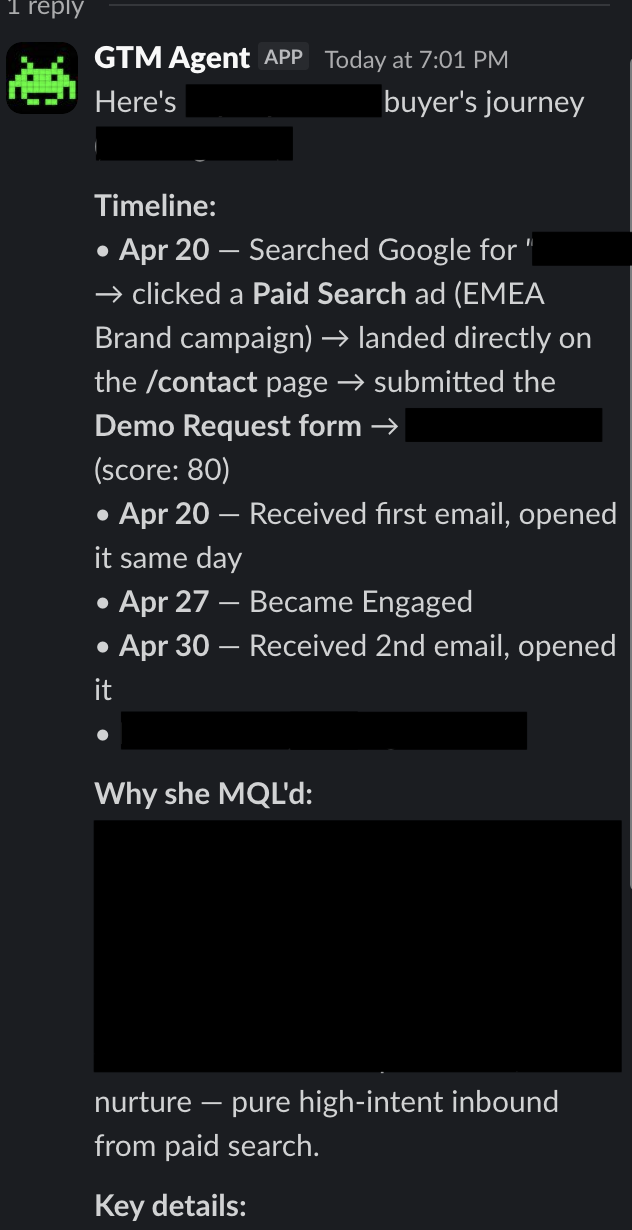
Someone in demand gen or sales wants to understand why a lead MQL'd. They ask the agent to look up the contact. It pulls the full buyer's journey from HubSpot — how they found us, what pages they viewed, what forms they filled out, what emails they engaged with, their lead score, their lifecycle progression. That used to be 15 minutes of clicking through HubSpot records and piecing it together manually. Now it's one Slack message.
PMM wants to know how a blog post is performing. The agent pulls that from GA4 — page views, sessions, traffic sources, engagement. Same Slack thread, different platform under the hood. They don't need to know or care which system the data lives in.
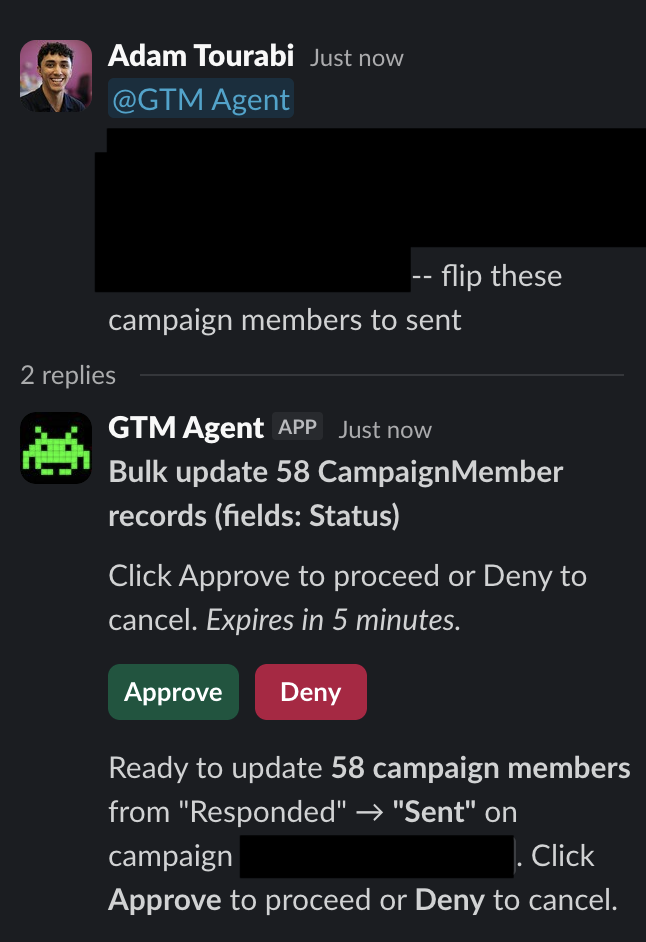
If someone needs to bulk update campaign member statuses or mass import a list to a campaign, they tell the agent in Slack. It builds the operation, posts an approve/deny button with exactly what it's about to do, and waits. One click to execute. No CSV uploads, no data loader, no asking me to do it.
The use cases I didn't plan for turned out to matter the most. People across the team started using it for questions I never would have built a dashboard for — one-off checks, cross-platform lookups, things that aren't worth a report but still take 10 minutes to answer manually.
Outcome
What started as a way to offload data requests became a tool the marketing team actually uses every day. Self-serve data across three platforms with business logic built in. 10-15 hours a week that used to go to ad-hoc reports now goes to actual strategy work.
The thing I'd tell anyone building an internal agent is to start from the workflow, not the technology. What problem are you actually solving, where will people interact with it, what does it need to know to be useful on your specific data, and what should it not be allowed to do without asking. Those decisions shaped this project way more than any technical choice did.
GTM Ops people are in a good position to build these. We already know the data model, how objects relate to each other, what fields matter and which ones are garbage, and how data flows across the stack. That institutional knowledge is what the agent actually needs to be useful, and it's not something you get from just connecting an API.
There's an irony here. The data quality work that nobody wants to prioritize — documenting fields, cleaning up schema, sunsetting what's legacy — turns out to be exactly what makes or breaks an agent. That documentation work is the context layer. A person can work around bad data because they know the org. An agent can't. And that's just the schema, before you even get to messy associations, wrong values, broken workflows, or fields that were never populated correctly. The people who've been doing that work for years are the ones who know how to build the context layer an agent actually needs.
← adamtourabi